Shared workspaces and roles
Invite teammates as administrators, editors or viewers. Switch between your own and shared workspaces. Server-side permissions protect changes and membership can be revoked.

Business CRM
Good relationships. Great business.
A spacious blue business CRM for customer relationships, shared workspaces, sales opportunities, enquiries, quotations, invoices and follow-up automation.
CoreBiz IT Services & CRM brings everyday customer work into one shared workspace. Manage contacts and companies, keep deals moving through a six-stage pipeline, capture public enquiries and create the follow-up tasks that matter. The expanded release adds role-based team access, mapped CSV imports, quotations and invoices, printable documents, private sharing links, manual receipt tracking and in-app automation. The blue interface uses generous spacing and responsive layouts. Email, payment and AI provider adapters are prepared but remain disabled until dedicated accounts are configured.
Small businesses, freelancers, consultants and service teams who want a clear place for customers, opportunities, documents and follow-ups. Owners can invite administrators, editors and viewers into a shared workspace while retaining separate account access.
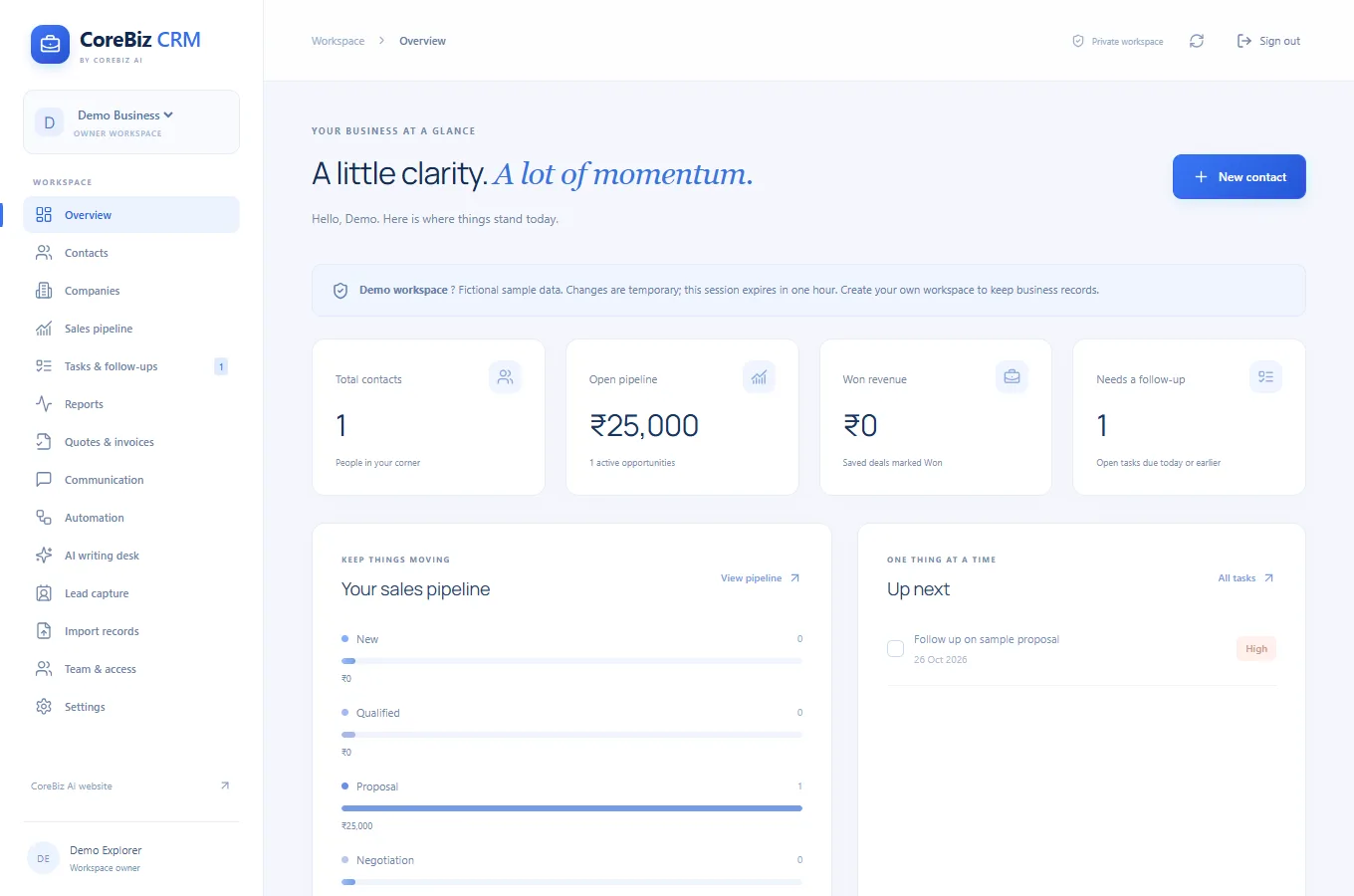
Inside the workspace
Invite teammates as administrators, editors or viewers. Switch between your own and shared workspaces. Server-side permissions protect changes and membership can be revoked.
Store customer details, relationship types, company links and notes. Search your records and export them as CSV.
Track INR opportunities across New, Qualified, Proposal, Negotiation, Won and Lost, with linked contacts, expected close dates and notes.
Set follow-up dates and priorities, mark tasks complete and review due work, pipeline value and recent activity.
Import up to 200 contact or company rows per file. Map columns, preview validation and skip duplicates before an atomic confirmed import.
Create and pause consent-based enquiry forms. New emails become Lead contacts; repeat messages remain in a separate enquiry inbox without overwriting contact details.
Create itemised INR documents with tax and server-calculated totals. Preview, print or save PDF, and create a draft invoice from a quotation. Confirm applicable tax requirements before issuing.
Share documents through revocable private links and record confirmed received payments with date and reference. Manual receipts do not verify bank settlement.
Create an in-app task the first time a saved deal matches a stage rule. Rules run on deal creation/save and avoid duplicate tasks for the same rule and deal.
Save email or WhatsApp drafts and open them in your own messaging app for review and manual sending. Connected email delivery is disabled until configured.
Prepared tools for relationship summaries, follow-up drafts and evidence-based lead priorities. They remain disabled until a dedicated AI key is configured and require explicit consent.
Email verification/recovery and Razorpay payment-link adapters are implemented with mock-provider tests. External delivery, checkout and AI calls remain disabled in this live release until configured.
THE EVERYDAY PROBLEM
A customer asks for a proposal. You make a note, send a message and promise to call again next week. When that information lives across a spreadsheet, a notebook and a chat thread, the next action becomes easy to miss.
CoreBiz IT Services & CRM connects the person, their company, the opportunity and the follow-up. The goal is a clear record of what is happening and what you need to do next.
A PRACTICAL EXAMPLE
For example, an independent web designer receives an enquiry from a local retailer. The designer adds the retailer as a company, saves the decision-maker as a contact and creates a website opportunity with an INR value.
After a discovery call, the deal moves from New to Qualified. When the proposal goes out, it moves to Proposal and a follow-up task is scheduled. The designer records the next conversation in notes and marks the deal Won only when appropriate. This is an illustrative workflow, not a customer result.
ACCESS AND DATA
CoreBiz IT Services & CRM keeps the existing private SQLite database outside public website files. Passwords remain salted hashes and production sessions use HttpOnly Secure cookies. Owners can invite team members into a shared workspace with server-enforced roles.
Shared workspace selection is separate from account identity. Membership removal revokes access; viewers cannot change records, and editors cannot delete core CRM records. Imports, lead capture, document sharing and provider actions validate workspace ownership. These safeguards are not a claim of independent security certification.
WHAT THIS RELEASE COVERS
The expanded release includes shared access, imports, lead forms, quotations/invoices, manual receipts, communication drafts and stage-based task automation. Existing CRM records remain in the same database.
External providers will be configured later at the owner?s request. Email delivery, online collection and AI writing are disabled on the live installation. WhatsApp opens a manual draft. Payment reconciliation is a manual provider-status check when configured; automated campaigns, scheduled external reminders and automatic refunds are not enabled.
Sign in with username admin and password admin. Each login creates an isolated sample workspace for one hour. Real business data should be stored in a registered account.
Yes. Owners can create private invitations for administrators, editors and viewers. The recipient registers/signs in with the invited email and accepts the link. Invitation delivery is manual.
Yes. Export it as UTF-8 CSV, choose contacts or companies, map columns and validate the preview before importing. Up to 200 rows/200 KB per file; duplicate records are skipped and existing records are not overwritten.
Yes. Add line items, INR rates, tax, customer details and notes. Review the preview, print/save PDF and optionally create a revocable share link. Check your tax and invoice requirements before issuing.
Stage rules create in-app follow-up tasks. Email and WhatsApp drafts can be reviewed manually. Scheduled email/SMS/WhatsApp sending is not enabled.
The screens and provider adapters are implemented, but dedicated provider accounts have not been configured. AI writing, online payment links and external email delivery are disabled and labelled Not connected.
Yes. The upgrade retains the same database, accounts and existing CRM records. New capabilities use additional tables.
The reset-link flow is implemented but email delivery must be configured first. Keep your password safe until that provider is connected.
Getting started
Use admin / admin to explore an isolated one-hour demo with fictional records. For persistent business data, create your own email/password account. Owners can generate seven-day invitation links for teammates with matching account emails. Email recovery and verification, online payment links and AI writing require dedicated providers to be configured later.
Open live projectA student-focused marketplace with opportunity discovery, optional AI coaching, scam-warning checks, college schedules, milestones, earnings records and consent-based placement sharing.
A complete appointment-led workspace for bookings, customer relationships, sales, staff schedules and day-to-day service operations.
A home-service booking website for cleaning and cooking, with on-demand services, subscription options and guided scheduling.
THE JOURNAL
CoreBiz IT Services & CRM
List who needs to read records, who edits them and who manages membership.
Read article ↗CoreBiz IT Services & CRM
Keep relationship context separate from guesses.
Read article ↗CoreBiz IT Services & CRM
Define what evidence moves an opportunity from Qualified to Proposal or from Negotiation to Won.
Read article ↗CoreBiz IT Services & CRM
Start a review with due tasks, then identify opportunities with no next action.
Read article ↗CoreBiz IT Services & CRM
Clean column headings and review a small sample before importing.
Read article ↗